How to send money from Australia to India
PandaRemit_OP - 29

Use Panda Remit to set up an AUD to INR transfer, choose Bank Account or UPI receiving, and track your payment through to delivery. This guide walks you through the app from registration to your final order status.
Before you start
Have your mobile number or email address, the AUD amount you want to send, an available payment method and an accepted identity document ready. Select Australia as your sending country.
Prepare your recipient details
For either receiving method, ask for the recipient's full name, street address, city or town, and remittance purpose. Use the name registered to the selected bank account or UPI ID.
Bank Account Account number, IFSC code and Indian mobile number .
UPI UPI ID, confirmed directly with your recipient.
What this guide covers
Download and register / Check your quote / Verify your identity / Add a recipient / Pay and track
Screenshots are illustrative. Rates, fees, offers, limits, payment options and delivery estimates may change. Review the details displayed for your own transfer before confirming.

Step 1 Download and open Panda Remit
Download the official Panda Remit app from the App Store or Google Play. Open it and tap Register if you are a new user, or Login if you already have an account.
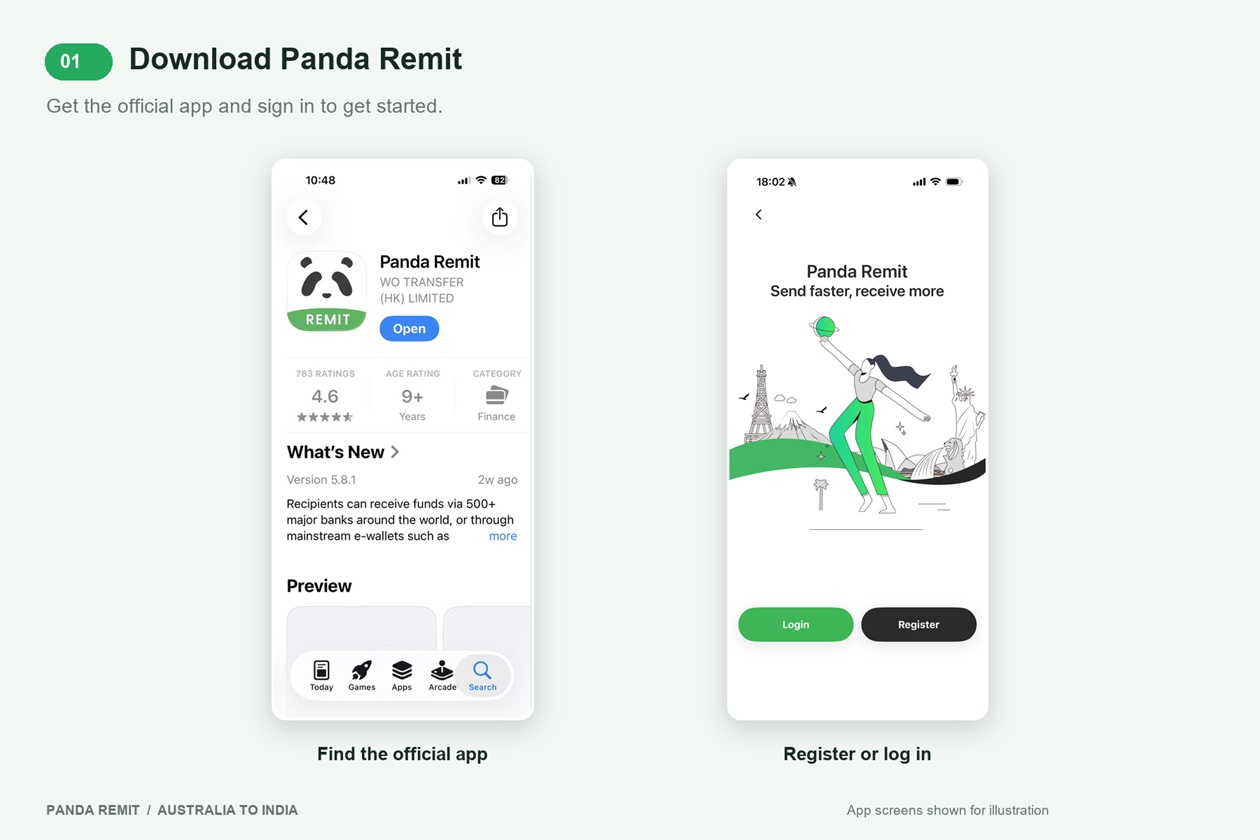
Download Panda Remit

★ ★ ★ ★ ★
4.5/5 (540,000 reviews)

★ ★ ★ ★ ★
4.8/5 (350,000 reviews)

Step 2 Select Australia and register
Choose Australia as the country you are sending from. Register with your mobile number or email address and follow the prompts. Other sign-in options may also appear in the app.
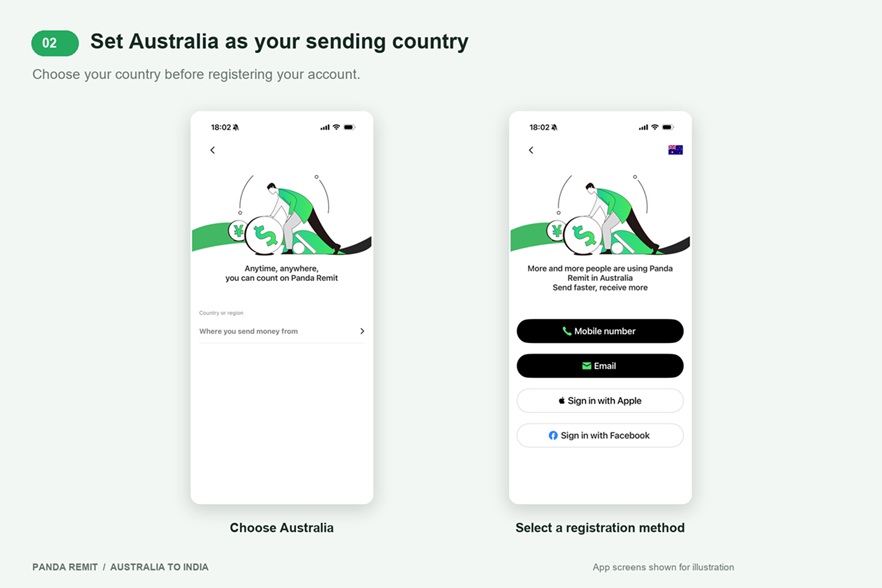
Check the sending country before continuing so that you see the relevant currency and payment options.

Step 3 Set up your AUD to INR transfer
Select India as the receiving country and enter the amount you want to send in AUD. Review the estimated INR amount, exchange rate, fee and arrival estimate. If an eligible coupon is available, check its conditions before applying it.
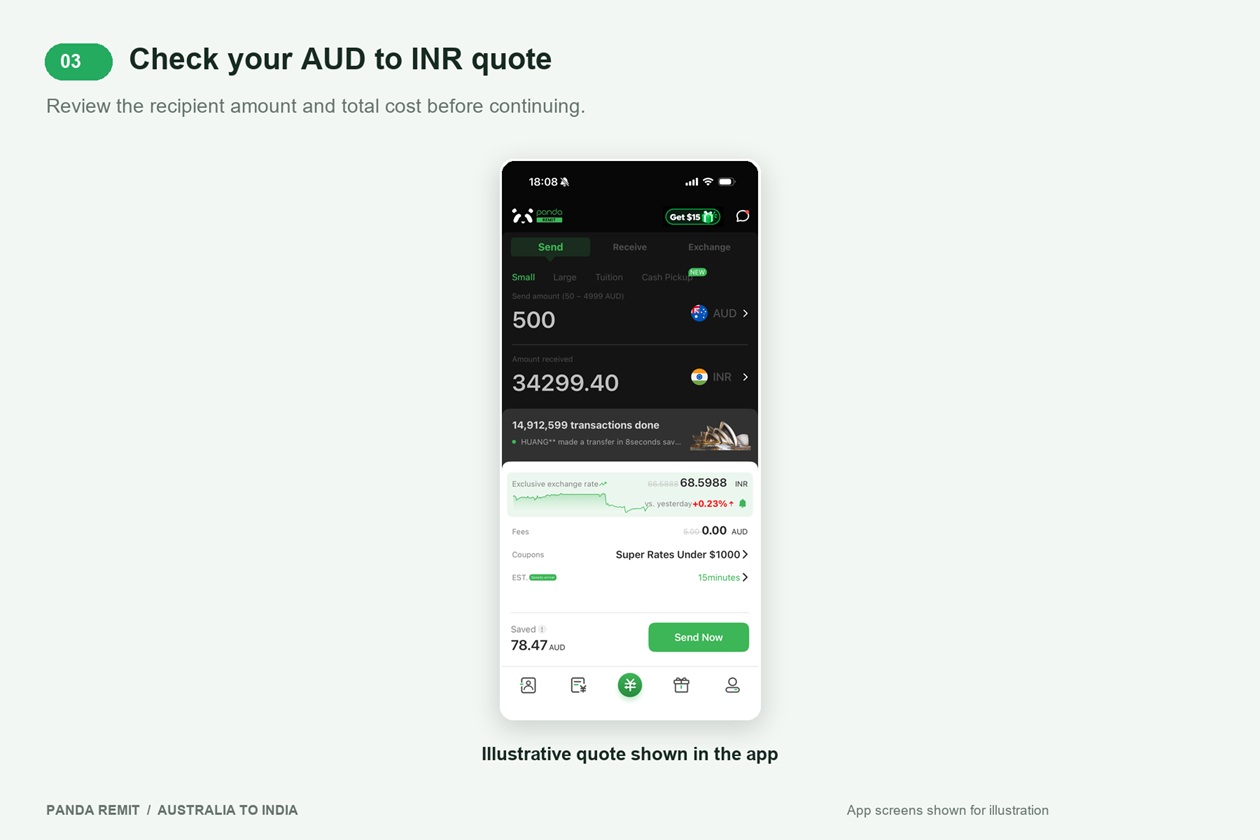
The amounts and promotional messages in this screenshot are examples, not a current quote. Use the rate, total cost and recipient amount shown in your own app when deciding whether to proceed.
Check the exchange rate, transfer fee, total AUD cost and final INR amount together. Apply a coupon only after checking its eligibility and conditions.

Step 4 Complete identity verification
If prompted, open the account-verification section and enter your payer information as requested. Use details that match your identity document. Verification may appear at a different point in the flow depending on your account.
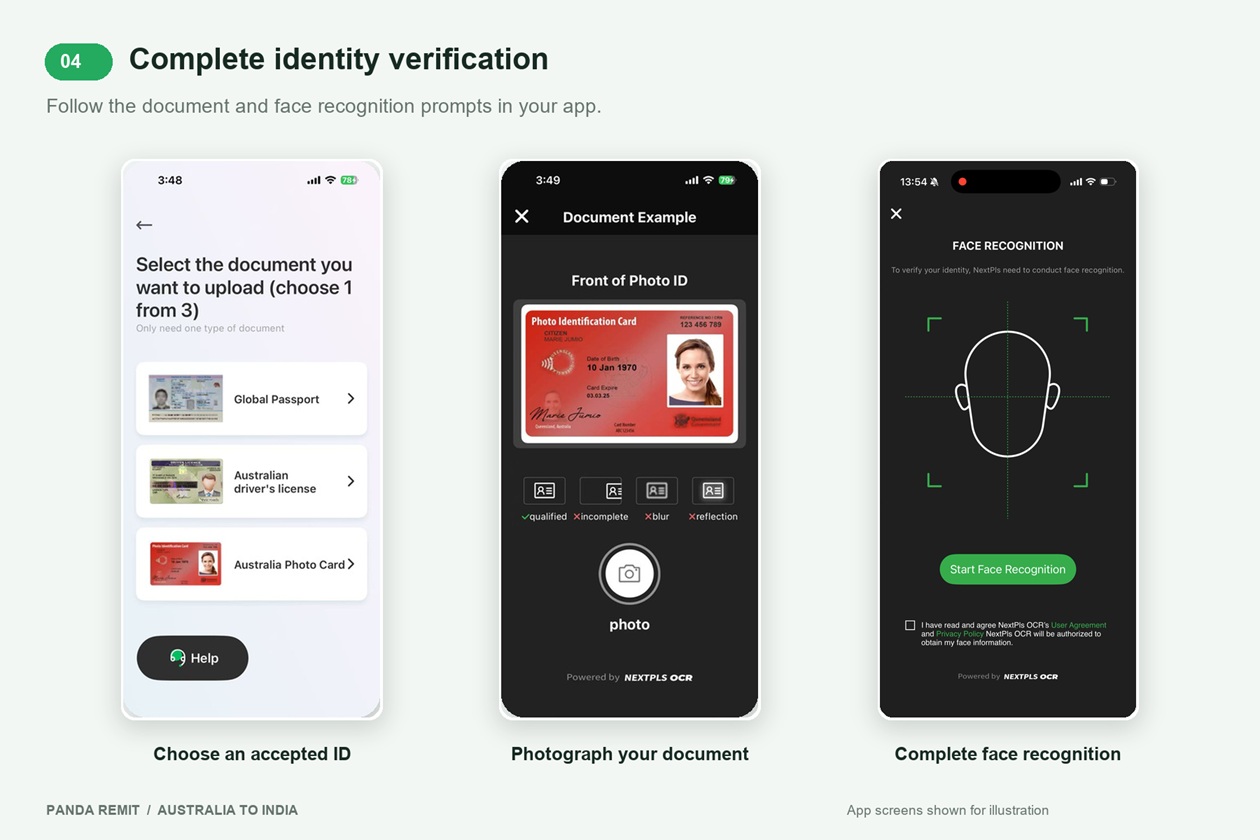
The verification flow shown in this guide lists a passport, Australian driver’s licence and Australian photo card. Select an accepted document shown in your app, photograph it as instructed, and complete face recognition when requested.
Use a clear, well-lit image and follow the on-screen capture instructions. Continue once the app allows you to proceed.

Step 5 Choose Bank Account or UPI
Select the receiving method agreed with your recipient. For a bank transfer, choose Bank Account or a relevant bank entry shown in the app. For UPI, choose UPI and check any limit displayed for your transfer.
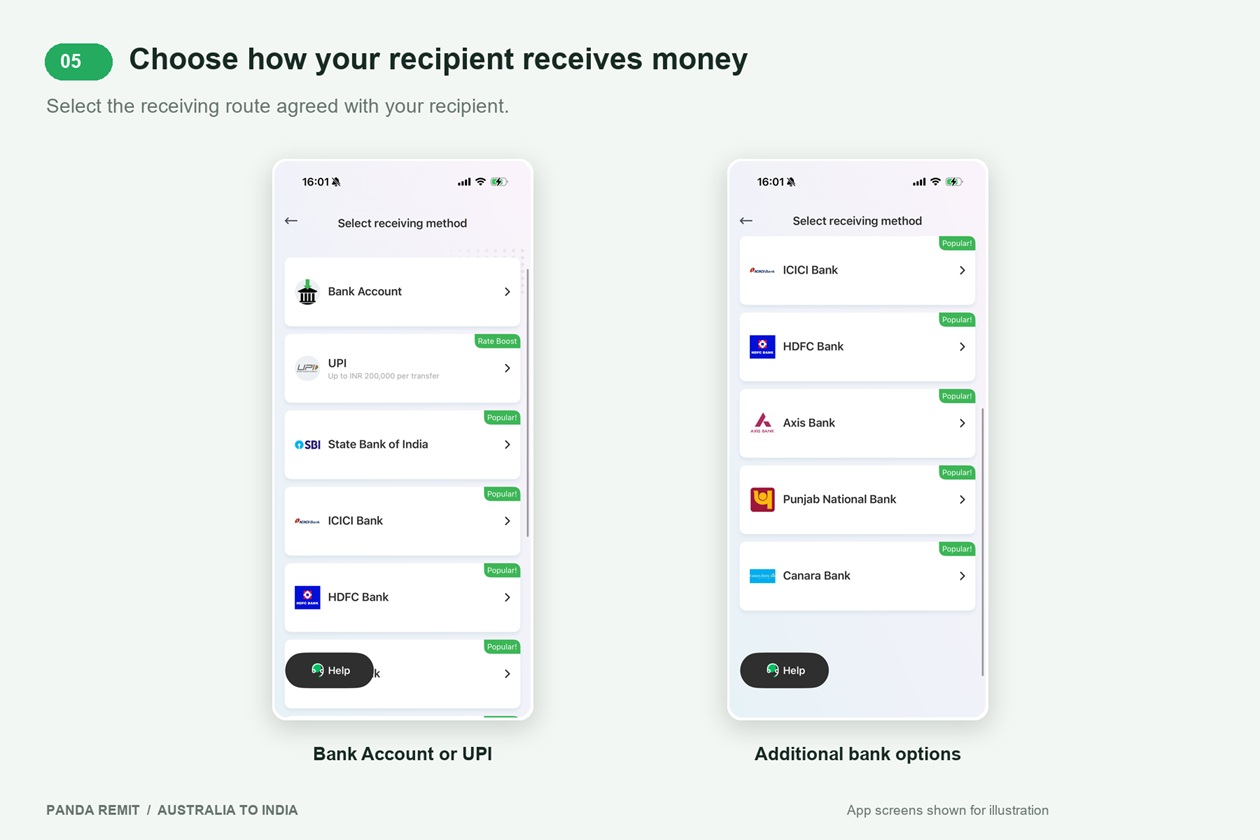
The bank list includes SBI, ICICI Bank, HDFC Bank, Axis Bank, Punjab National Bank and Canara Bank. Check which options are available in your app.

Step 6 Enter and check recipient details
For Bank Account, enter the recipient’s name, account number, IFSC code, Indian mobile number and address. For UPI, enter the recipient’s name, UPI ID and address. Select the correct remittance purpose when asked.
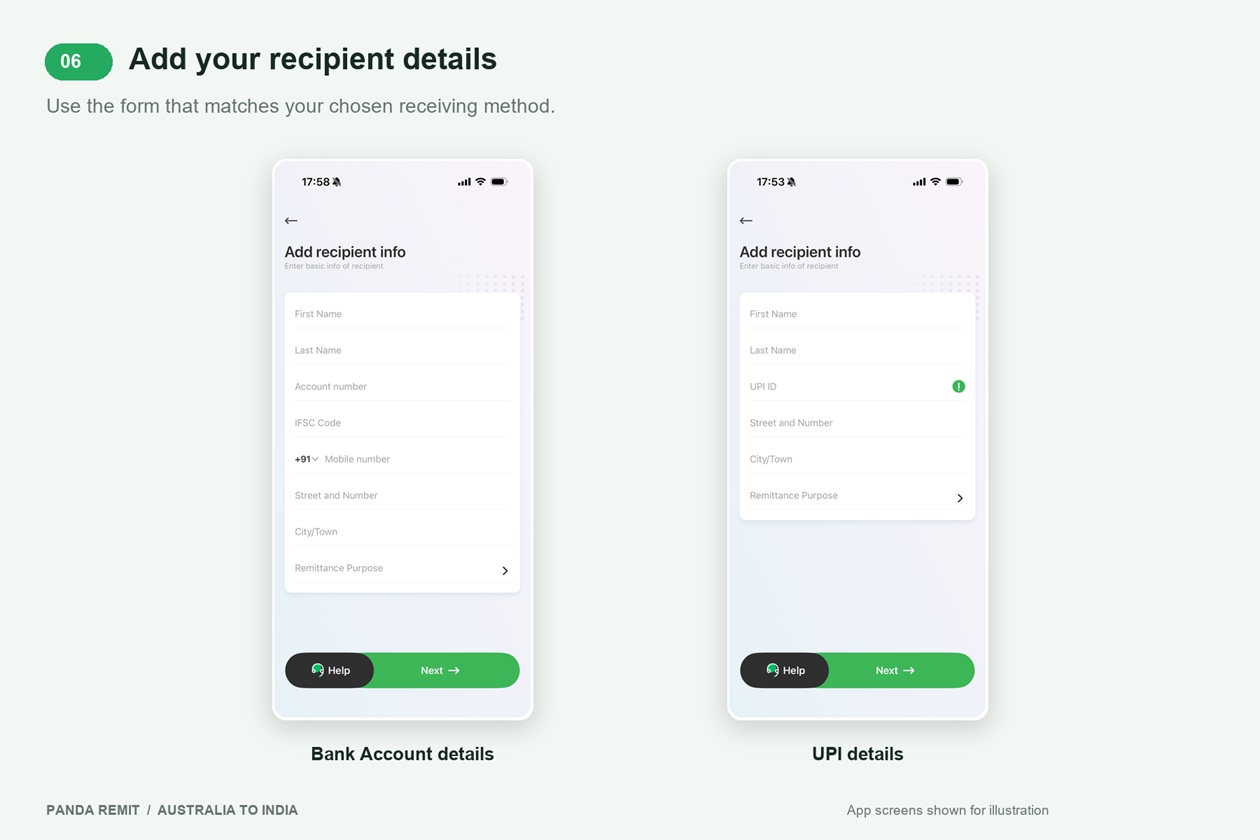
Confirm the account number or UPI ID directly with your recipient. Check every character and ensure the recipient name matches the selected account or UPI registration before continuing.
Do not guess a missing IFSC code or UPI ID. Ask your recipient to confirm their details before submitting the transfer.

Step 7 Select your payment method
Choose a payment method available for your transfer. The Australia payment screen shows PayID (Email address), Bank Transfer, Visa/MasterCard debit card and Balance Payment. Balance Payment requires sufficient available balance.
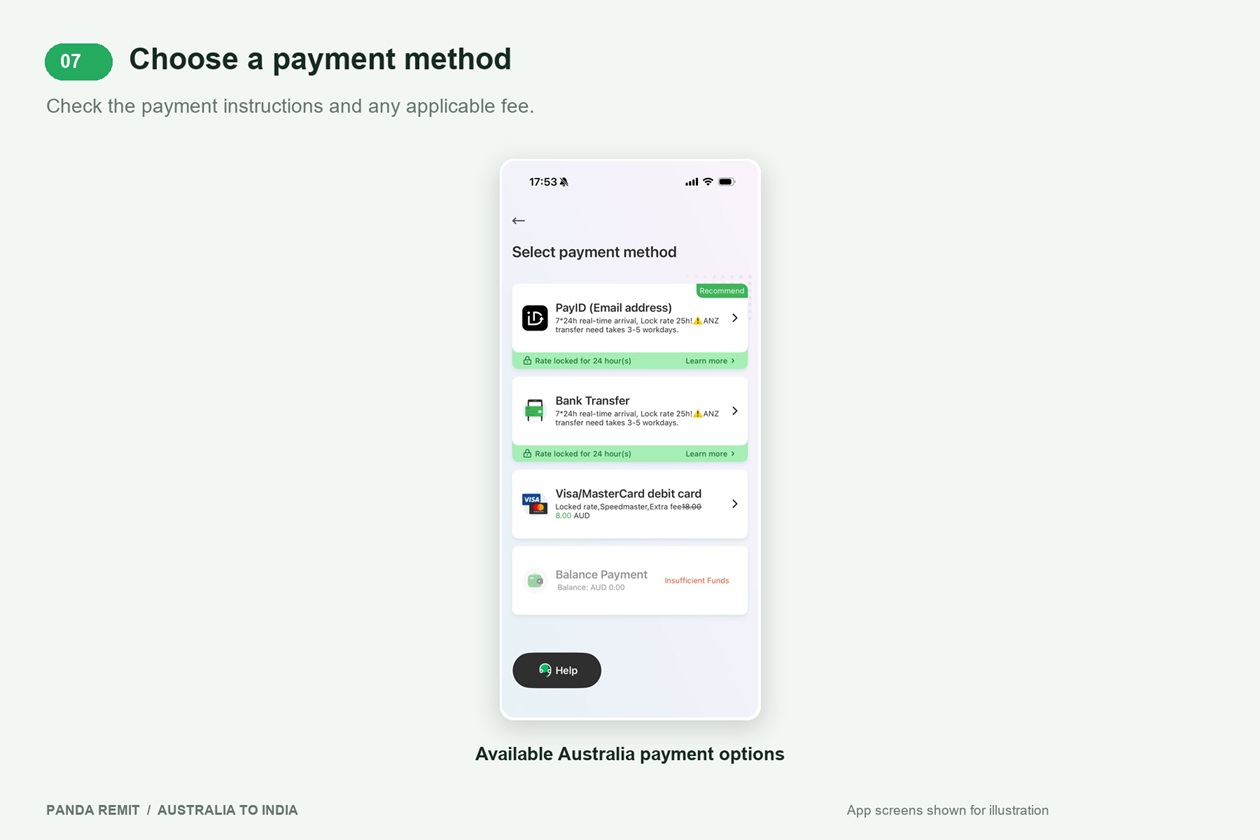
Read the instructions for your chosen method, including any payment reference, fee or deadline. Selecting a method does not by itself mean payment has been completed.

Steps 8 and 9 Review your transfer and track delivery
Check the recipient, receiving method, AUD amount, INR amount, exchange rate and fee. Confirm your source of income and remittance purpose accurately, and review any coupon. When everything is correct, tap Send Now and complete any remaining payment instructions.
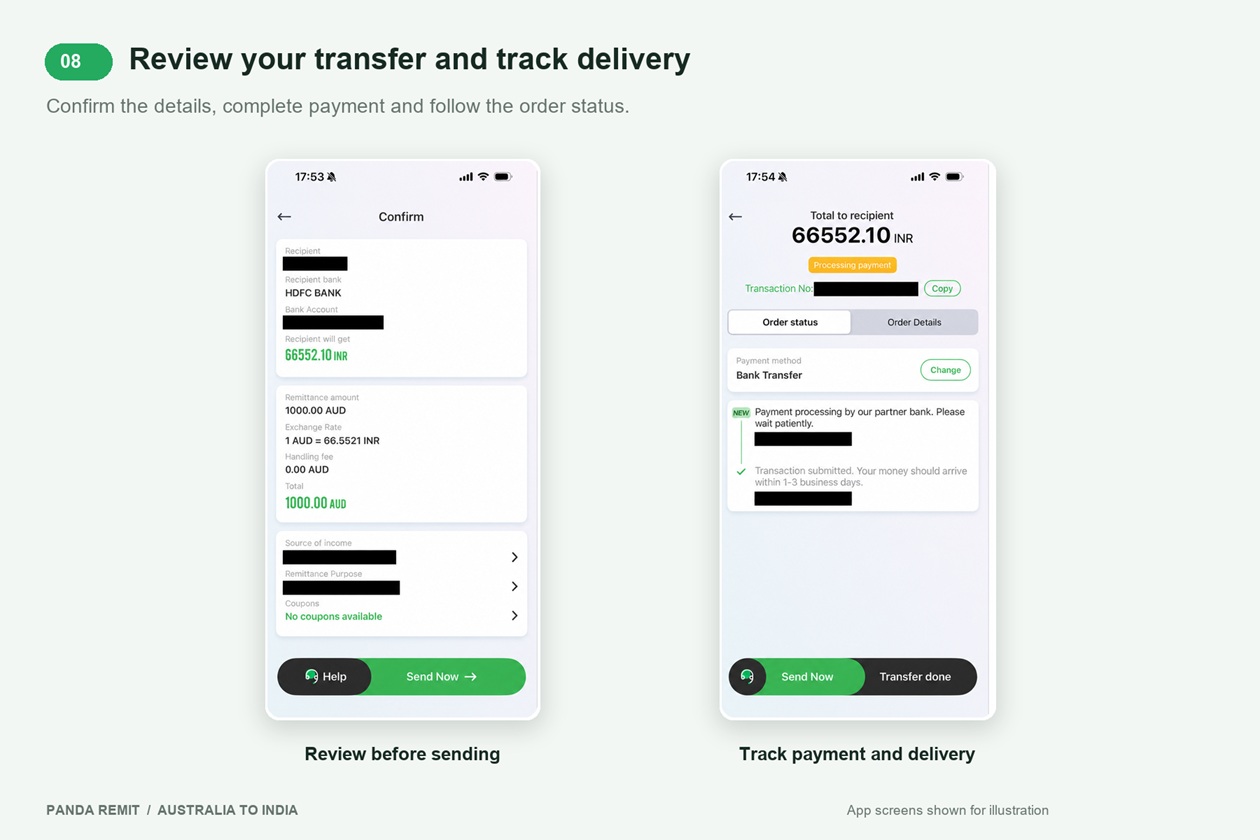
Open the order in Panda Remit to follow its progress. Keep the transaction number for support enquiries. A submitted order or Processing payment status does not mean the recipient has received the money. Check the latest status and arrival estimate in the app.
If payment remains pending or a transfer is delayed, review the order instructions and contact Panda Remit support through the app. Avoid creating a duplicate transfer until you understand the status of the first order.
A submitted order or Processing payment status does not confirm that the recipient has received the money. Check the latest order status in the app.
Frequently asked questions
Can I send money from Australia to India online?
Yes. This guide covers the Australia-to-India transfer flow in the Panda Remit app, including recipient setup, payment and tracking.
Can my recipient receive money using UPI?
UPI appears as a receiving option in the India receiving screen. Check whether it is available for your transfer and review any displayed limit. The recipient name should match the name registered to the UPI ID.
What is the exchange rate and transfer fee?
Review the AUD to INR rate, transfer fee and recipient amount in the app before confirming. Screenshot values are illustrative and may differ from your quote.
How long does an Australia to India transfer take?
Check the arrival estimate for your transfer in the app. Delivery time depends on the payment and receiving methods, identity and risk checks, bank and partner processing, weekends and holidays.
What if I entered the wrong recipient details?
Contact Panda Remit support through the app as soon as possible. Provide the transaction number and explain the error. Whether details can be changed depends on the transfer’s status; do not assume an already submitted transfer can be edited.
Do I need to complete identity verification?
Complete verification whenever the app requests it. Follow the document and face-recognition instructions displayed for your account.
Ready to send money to India
Open Panda Remit, check your AUD to INR quote and prepare your recipient’s details. Review the full transfer information before confirming, then track its progress in the app.
Open Panda Remit and Start Your Transfer
